Showing posts with label technology. Show all posts

Monday, November 25, 2013

ThingLink Fun!

One of the coolest sessions I attended at the iPad Summit in Boston two weeks ago was about ThingLinks.  I had never heard of these before that session, but they are so easy to make and so useful in the classroom - especially 1:1 classrooms.  You can take any image and insert any type of link over top of it - basically creating a guided lesson for students to follow.  I created two this week - one for each of my math groups.  They worked out perfectly - as I was teaching one group, the other group was working through their ThingLink and vice versa.  I was even able to include videos that I had created so that students were still getting some instruction from me!  Here is the first ThingLink that I created:


I created the image in PicCollage using screen shots of problems they had already completed.  The videos linked over the images were created in Educreations.  I created the videos explaining how to do each type of problem.  Then, the question icon is their independent practice.  They can use the videos to help them solve all of the problems.  My students are very sweet, but not very independent yet.  By giving them the videos, I am giving them a resource to use so that they aren't constantly approaching me about each problem.  (And as much as I would love to, when you have 25 students in a class for 60 minutes, you cannot teach each of them one on one.)  Giving them the videos gives them a crutch, and allows me to be able to really work with other students that I may not have been able to get to before.

The second ThingLink I created is here:


This ThingLink is obviously focused on absolute value.  While the first ThingLink was designed as more of a review for students, this one was created to teach the initial lesson, and then I pulled them together as a group to clarify any misconceptions.  This was for my faster group of students who are a little bit more independent.  I created the image in PicCollage again.  It includes a video that I created in Explain Everything and posted to Vimeo.  While I love how that looks, I didn't realize Vimeo was blocked for my students - so I'll be using Educreations for now on.  I also linked to a website that had some practice problems, and included a Brainpop video/quiz that I wanted them to complete.  I edited the BrainPop image in Skitch to include the arrow, and text.  

A lot of these apps may be very familiar to some of you, but I really felt like I stumbled on a wealth of information during that session.  One of my favorite things about ThingLinks are once they're created, they're good to go - you can edit them if needed, and reuse them again and again.  They would be great for webquests too!

Do you guys have any cool ideas I could use these for that I may not have thought of?

~Brittany~

Monday, November 18, 2013

Frustrations and New Motivation

Well, if anyone is still following me, thank you.  I know it's been quite the hiatus. I am having a difficult year transitioning to 1:1 iPads, and was really feeling like I didn't have much to contribute, which kept me from writing.  The change has also kept me very busy, which has prevented me from blogging as well.  Going from teaching with paper and pencil to a paperless environment was a much harder transition than I had anticipated, and doing that with a very sweet, but very low group of students has made it even more challenging.  Thankfully, my principal provided the opportunity this past week for some colleagues and I to attend the iPad Summit in Boston.  This conference was so inspiring, and I really feel rejuvenated going back to school this week.  I love it when you have terrific professional development that just re-energizes you.  I learned so much and realized that I am greatly under-utilizing this fantastic tool that I have.

One of the most coolest things I learned about were ThingLinks (which can be used without the iPad) and I will be using them this week.  This website, www.thinglink.com, allows you to upload ANY image (as long as it is a picture type file), and then insert ANY type of link over the image (video, other images, text, soundbites, websites, ect).  I am going to use it as a station next week, where my students visit the image, and access the links to learn about absolute value and practice graphing absolute value.

TechChef4U (click here to go to her blog) was the presenter of this session at the conference, and this was her ThingLink that is filled with examples, and directions:


If you click on the little circles, or numbers on top of the image, you will find the things that she has linked to. She is also one of the speakers that inspired me to start blogging again.  I realized that I am really much more excited about teaching and much more creative when I am sharing my ideas, and so I need to start doing that again.  Once I finish my ThingLink, I will share it with all of you!  I am also going to share some of the other great resources, apps and ideas I learned about while in Boston over the next few days/weeks, I promise!

What are some ways you keep yourself motivated?

~Brittany~

Wednesday, June 5, 2013

More Laptop Fun

I was really worried a few weeks ago about how I was going to integrate the laptops into my classroom.  Don't get me wrong - I was excited as all get out - but still anxious.  My school  administration has been very good about not putting a ton of pressure on us to use them daily (or even weekly for that matter).   The overall feeling has been, use them when you can and for lessons where it works - in other words, don't force it or stress over it.  I was trying to figure out how I could use the laptops in ways that I already teach - and I was coming up with very few examples - it was stressful!  Once they had the laptops though, I realized now I can do the lessons I wanted to do before, but couldn't because I didn't have the resources.  For example, now I can have everyone complete an online activity at the same time instead of as a station.  This is great because a lot of online activities require more time to complete than one station rotation.


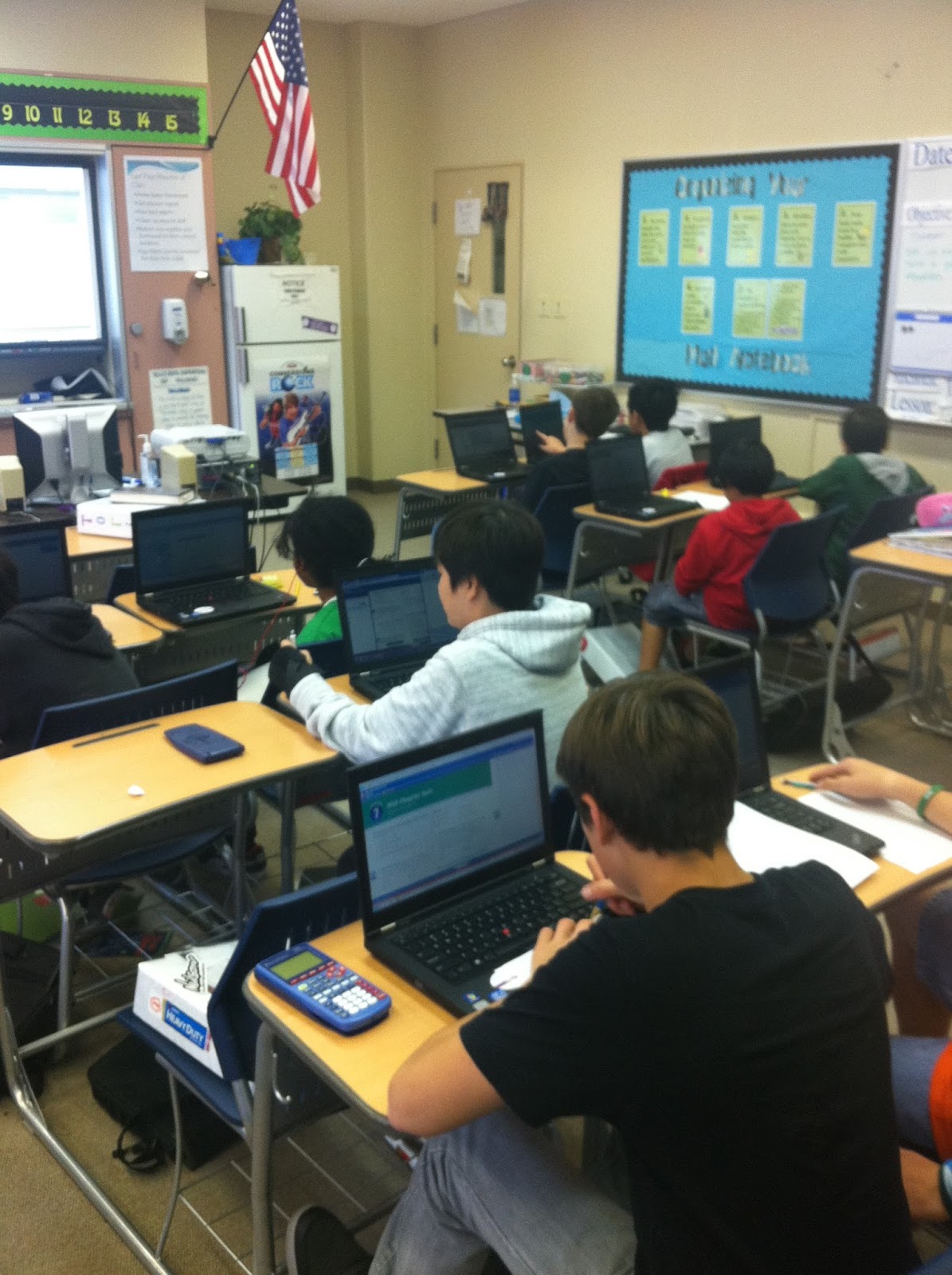
Students working on their laptops - I had to rearrange my classroom for my pretty new SmartBoard (see it on the wall?!)


I already shared this website, but www.internet4classrooms.com is just awesome.  The more and more I go through it, the more pleased I am.  I found the website I used for my lesson a few weeks ago on percents with discounts, interest and tips on here.


I had students visit http://www.mathplayground.com/mathatthemall2.html.  The website calls this a game, but I would describe it more as an activity.  Anyways, the students select their character and visit different stores in a virtual mall where they solve all kinds of percent problems.  They have to calculate tip at a cafe, interest at the bank, and discounts at the toy store and gym. Even better is the students get to make decisions that create the problems - they chose what to order at the cafe, how much money to deposit at the bank and what toys to buy at the toy store. The activity breaks the problems up into parts (and my only complaint is that they never really give them a chance to solve the problem from beginning to end without breaking it up for them), but I really liked it as an introduction to how to solve these types of percent problems.  I followed up this activity with some additional practice that offered less guidance.

The Home Screen for the game - students can choose where to go from here.
The Cafe in the game - students can select what they order here - I put out a few options of my own as an example.


What are some websites you've found that are just great?

~Brittany~

Monday, March 4, 2013

1:1 Laptops are HERE!

Wow!  We have finally rolled out all of our 1:1 laptops, and it is cool!  Our school is one of the pilot schools for DoDDS, and we have been preparing and planning all year for these suckers... and they're finally here!  We rolled them out one team at a time, and because I teach math I have students from all different teams.  That was a bit of a bummer because it meant that half of my students had laptops at the beginning of the month, but I had to wait until last week for the last group to get them.  Anyways, I didn't waste any time once they had them - we did our very first activity using the laptops the very next class. 

Our Assistant Principal sent the math department a great site (www.internet4classrooms.com) which is filled with online resources.  The best part is that they have an entire section devoted to the common core, with links (notice that's plural - more than one) for each standard within the math common core.  I found a link on there reviewing a skill I know my students are still struggling with, and copied it to my homepage as a warm up.  When students came in, I had them log on, visit my homepage and click the link.  Then they completed the practice problems on that site while I took roll and all of those other management things.  The site I chose kept track of how many problems students had attempted and solved correctly, so I made my way around the room and took note of how everyone was doing.  These are the exact same types of problems I would have given them on paper, but unlike paper and pencil, I had no complaints (and even had someone ask if we could keep doing warm-ups like this).  Crazy... but very cool.


After a few minutes of this, I had students go back to my homepage and close their laptops.  I don't know if anyone is familiar with the website www.thirteen.org/get-the-math, but it is AWESOME!  I highly recommend it.  They have videos and corresponding challenges that show students how math is used in real professions - and they're jobs students think are cool - like video game designer, fashion designer, recording studio execs (is that what that would be called...?), and so on.  They also have extension activities where students can solve other, similar, challenges. 

I used the recording studio challenge already this year.  It was related to proportional reasoning, and showed the students how you have to be able to find a unit rate to mix two tracks of music together.  The students really enjoyed it - especially the extension activity where they picked their own songs to mix.  The only problem was that I only had five computers at the time, so I either had to put students in groups or have them rotate through the computers.  I had students watch the video as a class, and together we completed the first challenge.  Later on, I had them revisit the site as a station activity and mix their own music.


This time, we were working on percent application, so we completed the fashion designer challenge.  In this challenge the students are given a shirt that the designer has decided is too expensive to sell as is, so students have to choose from a predetermined list of choices to lower the price.  They have to calculate what the wholesale cost would be before a 220% markup, and then select their changes, and reenter the cost break down on a spreadsheet. I had students watch the video together as a class, and then we had a short discussion before I let the students begin.  I let them work in pairs (but required them to each complete the work).  I had some students who were struggling with how to complete the spreadsheet, but overall the activity went very well.  A few of the boys were not so pleased with the fashion part of it, but I only had one student (who happened to be a girl) who was not engaged in the activity (and that was out of 80 students - pretty good, I'd say).


I was very happy with how my first attempt at integrating the laptops went, and it definitely made more excited to use them again.  The students are much more engaged, which means they're learning that much more. 

Does anyone else have any really cool sites they want to share?

~Brittany~

Friday, October 19, 2012

Lovin' My Stations!

I mentioned in an earlier post about how I love stations, and I am trying to use them more in my class this year instead of avoiding them like the plague last year.  You know why I love stations so much?  Because after the first time we used them this year (see my post on that here), my students have been asking when we are going to use them again - and today, when they walked in and saw that we were doing stations for the 2nd time this week, they actually said (out-loud), "Stations! Yes!"  Now, I don't know about most of you but when I get my students to exclaim in excitement about something they get to do with math - well... it's fabulous!

I am going to tell you about the first set of stations we did this week, and leave the second set until later.  We are working on integers right now, and I really wanted them to have some more practice with adding and subtraction before we moved on to multiplying and dividing.  I did not want to just use worksheets because they're so boring.  An entire class period of worksheets sounded miserable, and I'm the teacher!  Anyways, I planned out four stations for the students to cycle through.  I love that even though the last time we did stations was a month ago, my students still knew how the system worked.


This is how I organize my station rotations.  Cute? No. Simple and effective? Yes.
(Just ignore the poll in the top corner - that was for something else I was keeping track of)
These are not the stations I used for this post, but you can see how I organize them in this picture.

My first station was an adding and subtracting integers memory game.  I laid all the cards out on the table face down and ready to go for the first group.  Every group after that was responsible for putting the cards back in the same way they found them so the next group was ready to play the minute they started the station.  Students took turns flipping over two cards - they had to say what the answer was to every expression they flipped over.  If they found a match they kept the cards and went again.  If they didn't find a match, it was the next player's turn.  This game always starts a little slow, but once they can start remembering where the cards are it gets really fun as they can't find the match but the next person can.  I am selling this game on my TeachersPayTeachers store.

Memory Game all laid out and ready to play!

The second station was very similar to a station I did last time (algebraic expression posters) - but this time they were only practicing the order of operations.  This is something that we already covered, and students had a test on but it is so important that I like reviewing constantly throughout the year.  Students solved each of the expressions on the poster and moved post-it notes labeled 1-9 around to show the answer.  Each post-it note gets used exactly one time.  If they find they need the same number or that they haven't used a number then they know they've made a mistake.  After they are done, I quickly check them and have them get a new poster to complete.  I have them work on these in pairs, and I love hearing their conversations as they discuss the correct order to solve the problems.

One of the posters that they worked on!


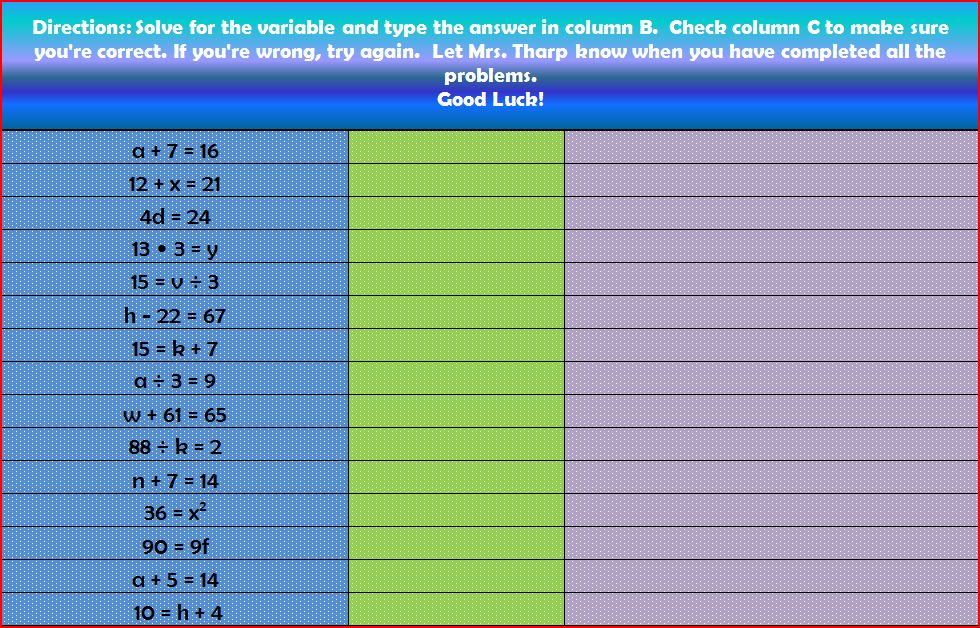
The third station was also very similar to a station I did last time (self-correcting excel spreadsheet).  This time they were practicing adding and subtracting integers.  If you want a copy of this, just click on the image below.  It looks really funny on google drive, but downloads correctly.  Students solve each of the problems, and type the answer in the second column.  They then check the third column to see if they are right or not.  I was planning on having them go to www.multiplication.com (LOVE this site, especially since I still have students who don't know their facts!), but our Internet was down.  (Don't you hate when that happens?!?)  Instead I had them work on their homework - an adding and subtracting integer worksheet. It wasn't nearly as entertaining, but the kiddos all seemed to appreciate having time to do their homework in class. 


This is the Adding and Subtracting Integers spreadsheet they did - see how in the third column it tells them whether they are right or wrong?


The fourth station was my favorite.  My students have done some graphing before, but never with all four quadrants of the coordinate plane.  We did a coordinate graphing picture earlier in the unit to practice, but I wanted to do a little more with it so I created this game.  It's battleship with the coordinate plane!  And, I made it with a Pirates of the Caribbean theme!  All of the ships are named after ships from the movie series, and my students LOVED it!  They were either the pirates or the royal navy, and hid their respective ships on their coordinate plane.  Then they took turns trying to find their opponent's ships by calling out coordinate pairs and marking them on their board.  I originally made a version that can be printed out on paper where you would break everyone into pairs, and pass out a pirates sheet to one player and a royal navy sheet to the other player.  Then, realizing that this would be a lot more fun with dry erase markers, I made a more permanent version using manila folders and laminating them.  Then, because I was so excited about it, I decided to sell it in my TeachersPayTeachers store.


The front of the folders - are you going to be the Pirates, or the Royal Navy?


My brilliant students actually figured out that if you use a binder clip the board would stand up on its own.  They're geniuses. 

Playing the game!

My second time with stations went really well - I just need to remember to set the timer at the beginning of each station!  Also, this was a good reminder that I always need a back up in case the Internet is down and I've planned an activity using it - this is when having good 'go-to' games are awesome (which I will talk about in a later post, I swear)!


What are some activities you use to practice integers? Do you have any 'go-to' back up activities for when technology decides not to cooperate?

~Brittany


Wednesday, October 3, 2012

Professional Development Day

We had our first professional development day this year, and I have to say I am very excited about how it went.  This year our school is piloting a one-to-one laptop initiative, and while I am super excited about getting those laptops into our student's hands, not everyone is.  We have a few teachers who are pretty anxious about the whole thing, but our ET (technology teacher) is AH-mazing, and got the ball rolling early.  The computers won't get here until January, so we have some time to get some PD in before the day arrives.

We spent the morning discussing in teams and departments logistical issues and curriculum issues.  There are a lot of schools that have implemented one-to-one laptop programs, but there is surprisingly little information on the how-to involved.  We often feel like we are making this up as we go.  There were a lot of good discussions in our teams and departments, which then translated into a good discussion as a faculty.  Almost all of the concerns we had were answered, and the few that weren't are going to be looked into. 

In the afternoon we had a variety of different sessions we could choose between, and they were awesome!  I think everyone I talked to learned something new and cool - and almost everything was presented by someone who teaches at our school!  I learned about a new software program called Netsupport where you can control all of your student's computers from your computer, or just monitor their work or basically whatever you want to do.  Can you imagine how awesome that is going to be when every student in your class is going to have their own laptop?  Now, I can look at everyone's screen at once and send messages to students who are off task or who need help.  I think that alone alleviated a LOT of concerns about classroom management. You can also turn off all the student's monitors just by clicking a button so they can't continue to work when you need to give directions, and about a hundred other awesome things.

Another session I went to was with the SmartBoard.  I used a SmartBoard in Virginia almost daily, but wasn't able to use mine here until this year.  I had seriously forgotten a LOT!  Another math teacher in our school was presenting on it, and she seriously knows her stuff!  It was awesome!  I relearned a few tricks, and learned some new ones that I'm excited to try out.  In fact, after this session I immediately went back to my room and reworked my lesson for tomorrow so that I'm using the SmartBoard to introduce adding integers.  It was also very entertaining listening to some of the teachers who had never used a SmartBoard get super excited about all of the cool things she was teaching us how to do.

I feel like too often professional development is a waste of time where we aren't learning anything that we can take back to our classrooms and implement.  A lot of times PD become discussions on theory and best practices - but without any ideas on how to implement those best practices.  I loved that today  I learned something that I can use tomorrow - this is how PD should be.

~Brittany~

Monday, September 17, 2012

Math Station Love

One of my goals this year was to get back to using math stations.  I loved using them in fifth grade - we used them at least every other class.  It's such a great way to keep the student's attention since they get to move and change activities every twenty minutes and they love stations.  I also love how easy it is to differentiate with stations and how much more small group time you get with students. I could go on and on about how much I love learning stations, but I won't bore you with that.  I didn't use stations last year as consistently because I couldn't figure out how to do it with more students and less resources.  I desperately wanted to get back to using stations, so I researched stations in middle school this summer to get some ideas.  My goal is to use stations at least every other week - honestly, I don't know that I'm going to be able to do that right away (especially with using our interactive notebooks).  I am, however, going to be using them this week for the first time!  I am super excited!

Algebraic Expression Puzzle Poster

Directions for Algebraic Expression Puzzles

My first station will be a review of order of operations and algebraic expressions all in one.  I used these last year as a whole class activity, and I'm hoping they will work just as well in small groups.  I'm calling them Algebraic Expression Puzzles.  Each mini poster has between five and six algebraic expressions on them, the value of each variable, and sticky notes labeled 1 through 9.  Students evaluate the expressions on a separate sheet, and then move the sticky notes so the expression has the answer next to it.  Each sticky note is used once per poster and all sticky notes must be used.  Students can check their work by making sure they've used each number once - and I always follow up with an answer key.  I do realize my posters have equal signs after the expression, and I wish I hadn't done that last year, but I don't want to waste them, so I may just white out the equal sign instead of redoing them.  I'm going to have students work on these in pairs within their groups, and then switch cards as they finish them.  Here is a copy of the directions if you would like to use this in your classroom!


Self Correcting Excel Spreadsheet - see the feed back in the third column?
 

I always try to have a technology station - this time I'm using a self-correcting excel spreadsheet.  The question appears in column A, students solve the problem and then type the answer into column B, and then Column C will tell them whether they are correct or not.  The ITRT (technology teacher) back in VA taught me how to make one my first year, and I love it.  It gives students a great way to practice and provides immediate feedback.  I can also change the feedback to say whatever I want (i.e. don't forget your signs!).  I figured out how to make them more attractive this year using the formatting tools so I'm on a roll with my making things cute.  :)  If you would like to try it out, click here.  The image on google docs is horrible, but if you download it, it works and looks like the one above.  This is the one my students use - I hide the formula so no one can accidentally discover the answers, and lock the sheet so no one messes up the questions or formulas.

My third station will be a game with powers and square roots.  I haven't worked out all the kinks for this one yet, but I'll do another post on the math games I play in class later - I have lots since one of my stations is almost always a game station.

The final station is usually an independent work station.  This time it will be different for each class since each of my classes is in a different place.  Some classes I will be finishing up our order of operations foldable (another post on that later), others I will have them complete an independent order of operations practice sheet, and one of my classes (my speedy class) will be making sure their notebooks are up to date and then playing multiplication war to practice their math facts. 

I'm hoping they go well - I feel like the first round of stations sets the tone for the year and so that's why I'm not working with a small group this time.  I want to make sure everyone is staying on task and can figure out how to make things work.  Once they have a grip on it I will start adding in a teacher led station.

Do you use math stations?  What do you love about them?  How do you run them?

~Brittany~